> ## Documentation Index
> Fetch the complete documentation index at: https://lightdash-mintlify-36962926.mintlify.site/llms.txt
> Use this file to discover all available pages before exploring further.
# Evaluations
> Test and validate your AI agent's performance with custom evaluation suites
Create custom evaluation suites to batch test your agent's performance and ensure consistent, high-quality responses across different scenarios.
 ## How evaluations work
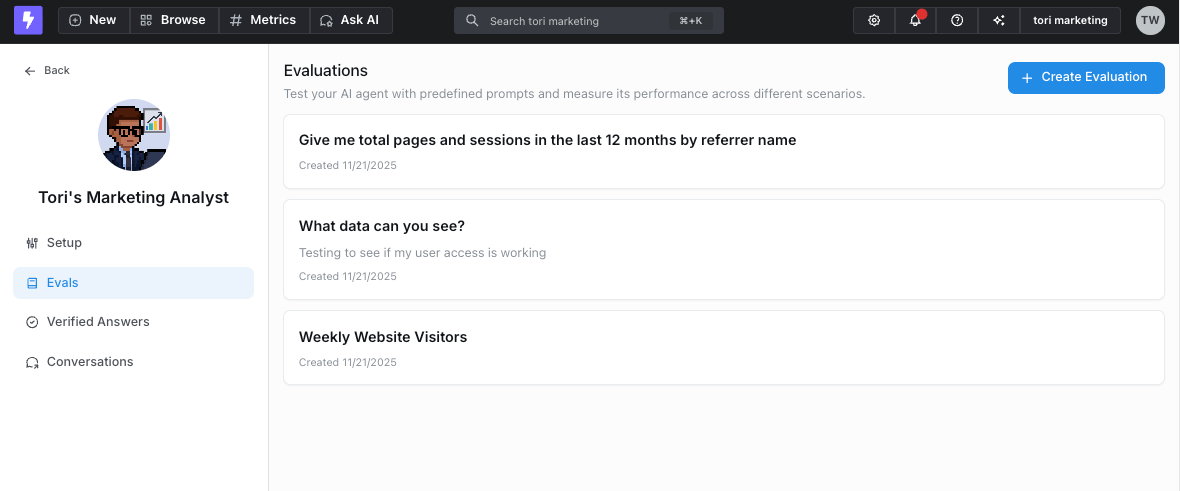
1. **Define evaluation questions** - Build a set of test questions for each agent. You can either:
* Manually create questions that represent common use cases
* Select responses from existing agent conversations in the admin page to add to your evaluation set
## How evaluations work
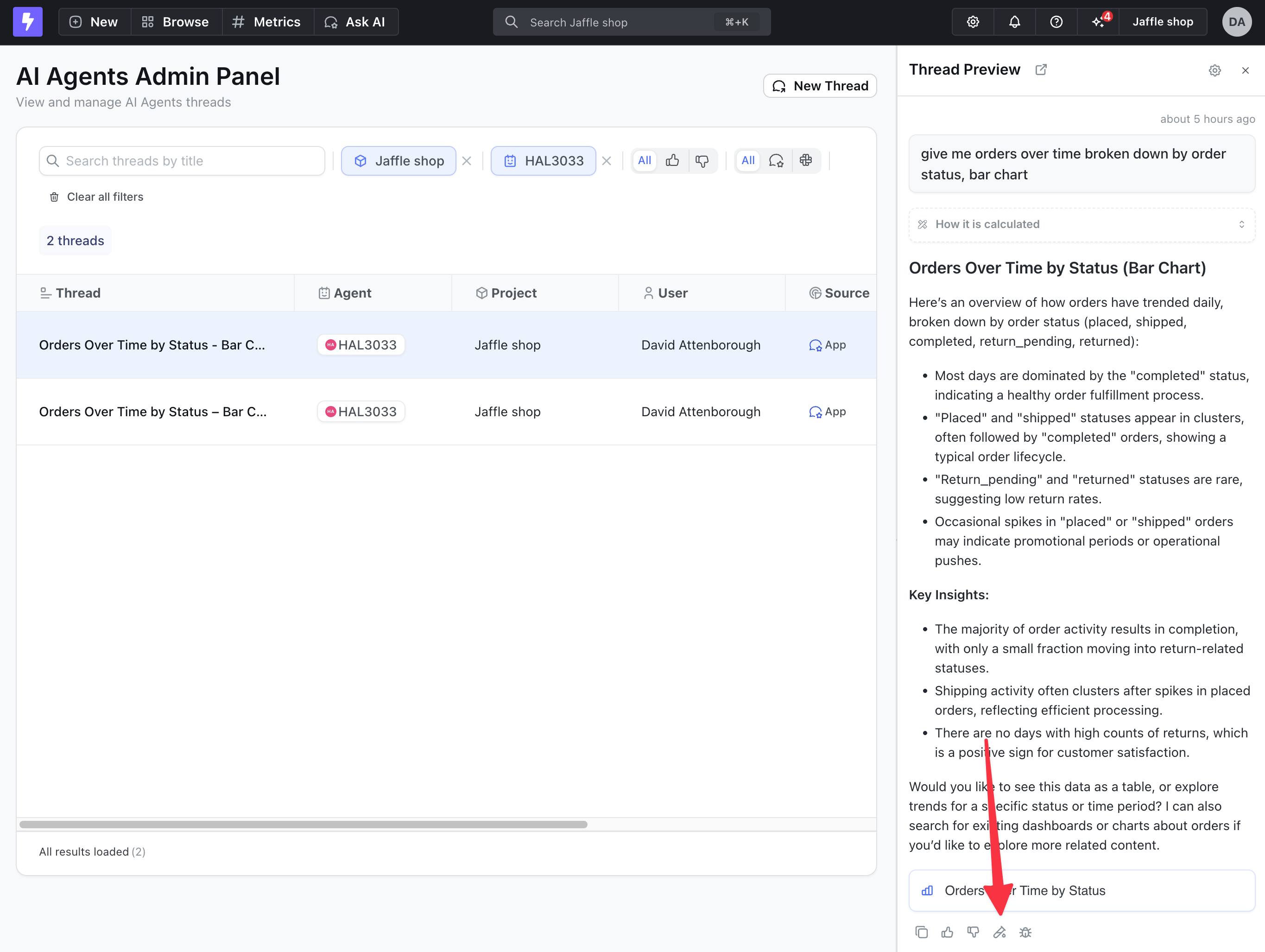
1. **Define evaluation questions** - Build a set of test questions for each agent. You can either:
* Manually create questions that represent common use cases
* Select responses from existing agent conversations in the admin page to add to your evaluation set
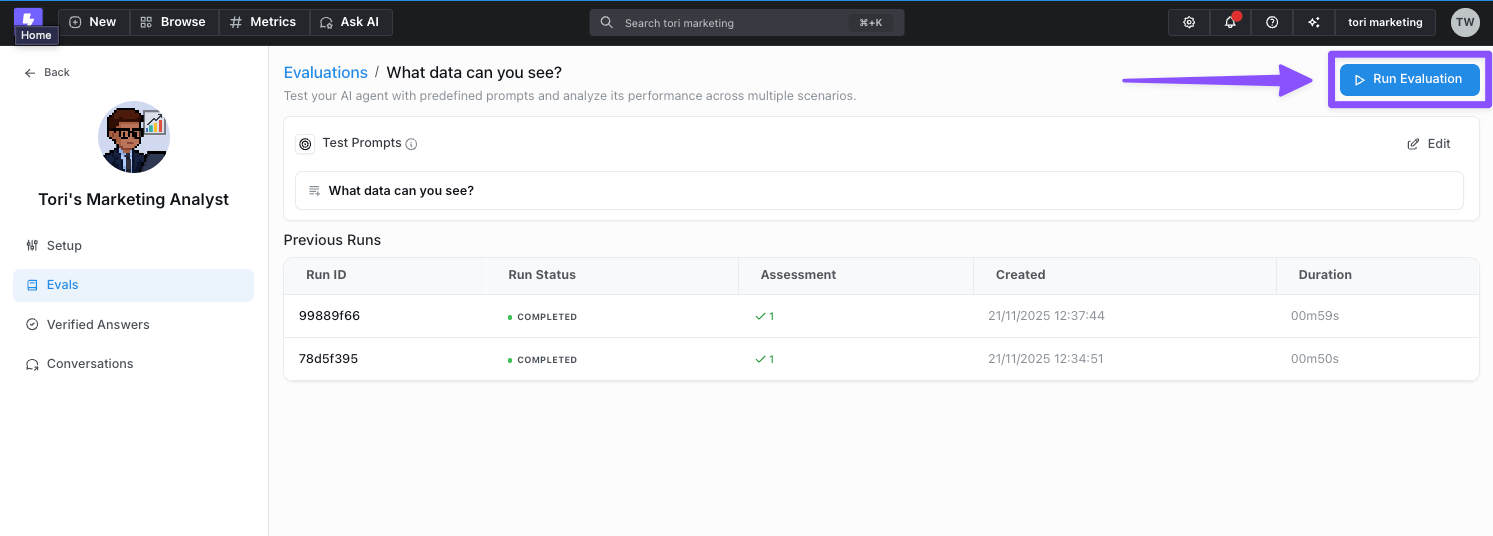
 2. **Run batch tests** - Execute all prompts in your evaluation set against the agent to see how it responds
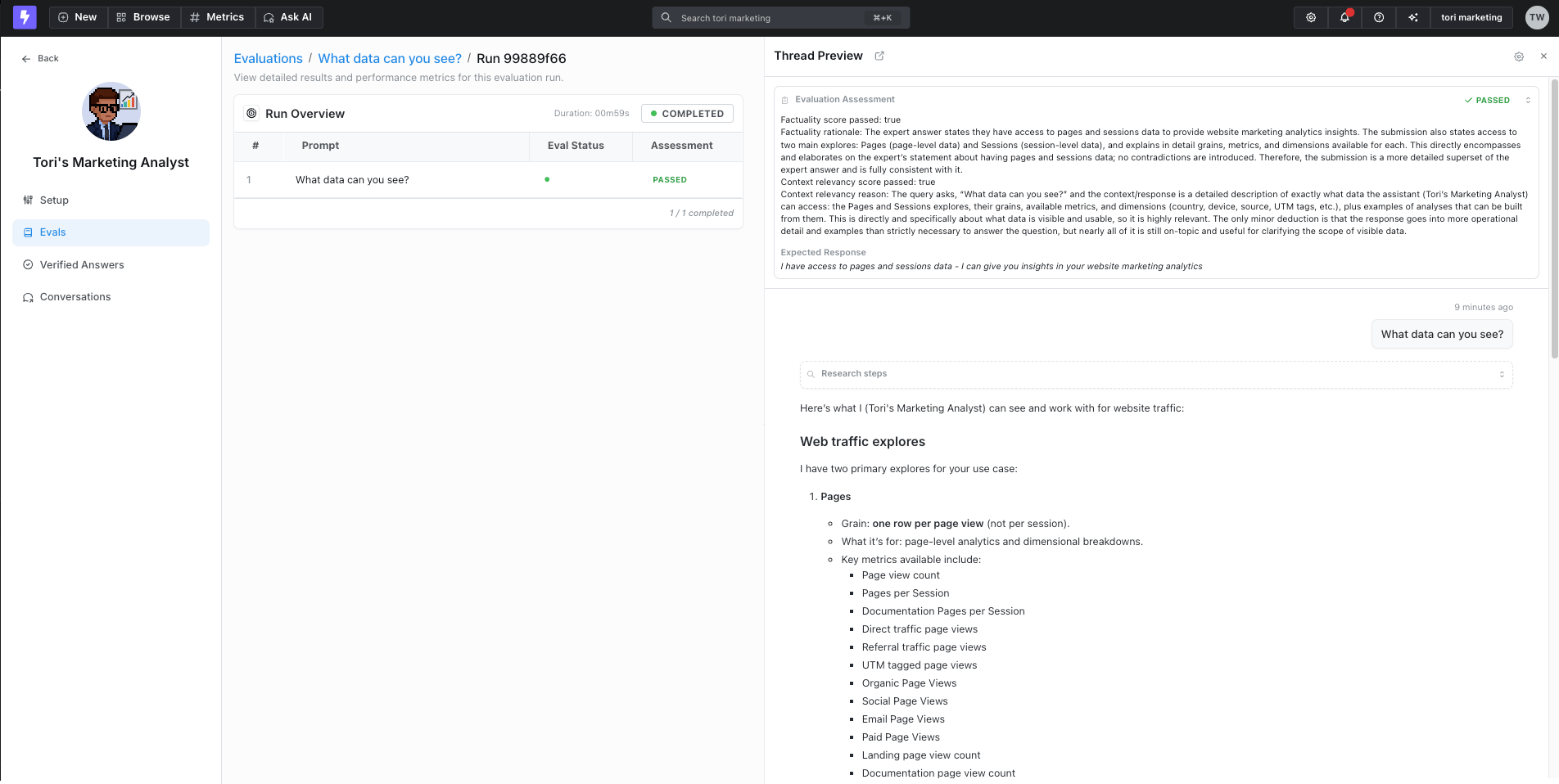
 3. **Review results** - Manually review the agent's responses to ensure they meet your quality standards and expectations. When you provide an expected response, Lightdash also runs an LLM-as-judge factuality scorer that automatically marks each result as passed or failed and shows its reasoning alongside your manual review
 ## Writing questions and expected responses
Each evaluation prompt has two fields:
* **Question (prompt)** — the message you want to send to the agent, exactly as a user would type it. For example, `"What's our total order revenue in 2024?"`.
* **Expected response** — a short, plain-language description of what a correct answer looks like. This field is optional; leave it blank if you only want to eyeball responses manually.
### What "expected response" is (and isn't)
The expected response is **not** a word-for-word script the agent has to reproduce. Under the hood, when a run completes, Lightdash sends the question, the agent's actual response, and your expected response to an LLM-as-judge that grades factual consistency, ignoring differences in style, grammar, and punctuation. The judge decides whether the agent's answer is a subset, superset, exact match, contradiction, or an unimportant difference — and only the first three count as a pass.
Because of that, the most effective expected responses are:
* **Short and factual.** Describe the key facts, numbers, or behaviour the answer must include — not the full sentence you'd like to see.
* **Focused on content, not phrasing.** Style, tone, and wording are ignored by the scorer.
* **Specific about numbers when you know them.** If a metric should return `1,189.60`, put that value in the expected response so the judge can check for it.
* **Descriptions of behaviour when there's no single "right" number.** For open-ended or ambiguous questions, describe what the agent *should do* (e.g. "asks for clarification", "returns a bar chart broken down by payment method").
You can write the expected response either as a single sentence or as a short bullet-style list of facts the answer must contain.
### Examples
Concrete question / expected response pairs you can adapt:
**Specific metric with a known value**
```text Question theme={null}
What is our total order revenue in 2024?
```
```text Expected response theme={null}
Replies with total order revenue of 1,189.60 for 2024.
```
**Chart or breakdown request**
```text Question theme={null}
Revenue in Q3 2024 for the "credit_card" and "coupon" payment methods, displayed as a bar chart.
```
```text Expected response theme={null}
Returns a bar chart from the payments explore showing total revenue broken down by payment method, with values for credit_card and coupon in Q3 2024.
```
**Ambiguous question — agent should ask for clarification**
```text Question theme={null}
What's our revenue?
```
```text Expected response theme={null}
Asks for clarification about which revenue metric and which explore to use, instead of guessing.
```
**Question the agent should refuse or explain a limitation for**
```text Question theme={null}
Can you forecast the revenue for next quarter?
```
```text Expected response theme={null}
Explains that it cannot perform statistical forecasting or predict future values.
```
**Empty-result question**
```text Question theme={null}
Show me orders where the order amount is greater than 1000000.
```
```text Expected response theme={null}
Replies with a message that there are no orders matching that filter.
```
**Multi-fact answer (list style)**
```text Question theme={null}
What's the total order shipping cost by month in 2024, and how does it change month-over-month?
```
```text Expected response theme={null}
Response contains total order shipping cost by month in 2024.
Response contains a month-over-month change for that shipping cost.
Uses the orders explore with a date dimension on the x-axis.
```
A good rule of thumb: if two different correct answers would both satisfy your expected response when read side by side, it's specific enough. If either would fail because of wording alone, it's too strict — trim it back to the underlying facts.
## Using feedback to improve evaluations
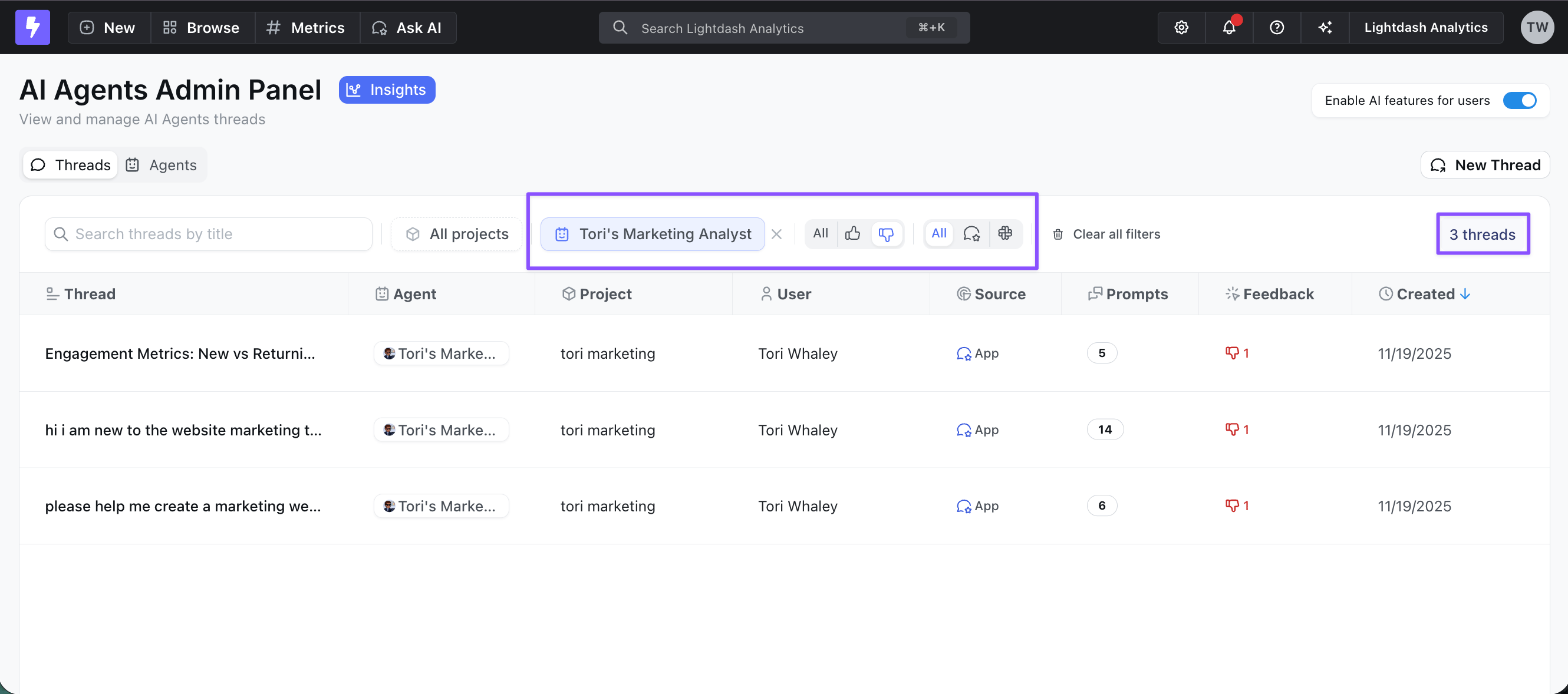
Encourage your team to actively use the thumbs-up/thumbs-down feature when interacting with AI agents. This feedback helps admins in two key ways:
* **Identify improvement areas** - Thumbs-down responses highlight where the agent needs work
* **Build better evaluation sets** - Filter and easily add thumbs-down responses to your evaluation suite to test fixes and prevent regressions
## Writing questions and expected responses
Each evaluation prompt has two fields:
* **Question (prompt)** — the message you want to send to the agent, exactly as a user would type it. For example, `"What's our total order revenue in 2024?"`.
* **Expected response** — a short, plain-language description of what a correct answer looks like. This field is optional; leave it blank if you only want to eyeball responses manually.
### What "expected response" is (and isn't)
The expected response is **not** a word-for-word script the agent has to reproduce. Under the hood, when a run completes, Lightdash sends the question, the agent's actual response, and your expected response to an LLM-as-judge that grades factual consistency, ignoring differences in style, grammar, and punctuation. The judge decides whether the agent's answer is a subset, superset, exact match, contradiction, or an unimportant difference — and only the first three count as a pass.
Because of that, the most effective expected responses are:
* **Short and factual.** Describe the key facts, numbers, or behaviour the answer must include — not the full sentence you'd like to see.
* **Focused on content, not phrasing.** Style, tone, and wording are ignored by the scorer.
* **Specific about numbers when you know them.** If a metric should return `1,189.60`, put that value in the expected response so the judge can check for it.
* **Descriptions of behaviour when there's no single "right" number.** For open-ended or ambiguous questions, describe what the agent *should do* (e.g. "asks for clarification", "returns a bar chart broken down by payment method").
You can write the expected response either as a single sentence or as a short bullet-style list of facts the answer must contain.
### Examples
Concrete question / expected response pairs you can adapt:
**Specific metric with a known value**
```text Question theme={null}
What is our total order revenue in 2024?
```
```text Expected response theme={null}
Replies with total order revenue of 1,189.60 for 2024.
```
**Chart or breakdown request**
```text Question theme={null}
Revenue in Q3 2024 for the "credit_card" and "coupon" payment methods, displayed as a bar chart.
```
```text Expected response theme={null}
Returns a bar chart from the payments explore showing total revenue broken down by payment method, with values for credit_card and coupon in Q3 2024.
```
**Ambiguous question — agent should ask for clarification**
```text Question theme={null}
What's our revenue?
```
```text Expected response theme={null}
Asks for clarification about which revenue metric and which explore to use, instead of guessing.
```
**Question the agent should refuse or explain a limitation for**
```text Question theme={null}
Can you forecast the revenue for next quarter?
```
```text Expected response theme={null}
Explains that it cannot perform statistical forecasting or predict future values.
```
**Empty-result question**
```text Question theme={null}
Show me orders where the order amount is greater than 1000000.
```
```text Expected response theme={null}
Replies with a message that there are no orders matching that filter.
```
**Multi-fact answer (list style)**
```text Question theme={null}
What's the total order shipping cost by month in 2024, and how does it change month-over-month?
```
```text Expected response theme={null}
Response contains total order shipping cost by month in 2024.
Response contains a month-over-month change for that shipping cost.
Uses the orders explore with a date dimension on the x-axis.
```
A good rule of thumb: if two different correct answers would both satisfy your expected response when read side by side, it's specific enough. If either would fail because of wording alone, it's too strict — trim it back to the underlying facts.
## Using feedback to improve evaluations
Encourage your team to actively use the thumbs-up/thumbs-down feature when interacting with AI agents. This feedback helps admins in two key ways:
* **Identify improvement areas** - Thumbs-down responses highlight where the agent needs work
* **Build better evaluation sets** - Filter and easily add thumbs-down responses to your evaluation suite to test fixes and prevent regressions
 This systematic testing approach helps you:
* Verify agent performance before deploying changes
* Ensure consistency across common queries
This systematic testing approach helps you:
* Verify agent performance before deploying changes
* Ensure consistency across common queries